Showing posts with label sharing widget. Show all posts

Friday, April 5, 2013

Beautiful Slide Egg Bookmarking Widget for Blogger

Beautiful Slide Egg Bookmarking Widget for Blogger 


 This is a attractive Social bookmark gadget.It woks
great with side open with including Hover Effect also.
It Include the buttons  Facebook share, Twitter,
Google +, Blogger, LinkedIn, Stumble Upon, Email
and the Share This Icon.This tutorial will helps you to
add it to your blog. Follow These Steps.


1. Log in to blogger account and Go to Design >> Edit HTML
  
2. Put checked marked in Expand Widget Templates

3. Find this tag by using Ctrl+F    </head>

4. Paste below code Before </head> tag


<script src='http://w.sharethis.com/gallery/shareegg/shareegg.js' 
type='text/javascript'/><script src='http://w.sharethis.com/button/buttons.js'
 type='text/javascript'/><script type='text/javascript'>stLight.options
({publisher: &quot;bea50586-2b9f-448d-947a-01385f28e305&quot;, onhover:false});
 </script><link href='http://w.sharethis.com/gallery/shareegg/shareegg.css'
 media='screen' rel='stylesheet' type='text/css'/>

Egg Bookmarking

5. Now Find this code  by using Ctrl+F </body>

6.  Paste below code Before </body> tag

<div style='position: fixed; bottom: 2%; left:
 2%;'><div class='shareEgg' 
id='shareThisShareEgg'/></div><script 
type='text/javascript'>stlib.shareEgg.createEgg(&#39;shareThisShareEgg&#39;,
 
[&#39;facebook&#39;,&#39;twitter&#39;,&#39;googleplus&#39;,&#39;linkedin&#39;,&#39;blogger&#39;,&#39;stumbleupon&#39;,&#39;sharethis&#39;],
 {title:&#39; 
<data:blog.pageTitle/>&#39;,url:&#39;<data:blog.url/>&#39;,theme:&#39;shareegg&#39;});</script><a
 href="http://www.bloggertrix.com/">Blogger Widgets</a>

7. Now save your template
 you are done.

4 In 1 Smooth Social Subscribing Slide Out For Blogger

4 In 1 Smooth Social Subscribing Slide Out For Blogger 

 This is nice widget for your blog.This will help
specially who don't have more space in blogger.In
this wideget include Smooth Jquery Facebook fan
page
, Twitter Follower Box, Google Plus 1 Button
and Rss  SubscribeWidget.That's why it say 4 in one.
Its too easy to add to  your blogger.You can follow
these simple steps to add it.


Demo

1. Log in to blogger and Go to  Design >> Page Element.

2. Click Add Gadget and select 'HTML/Javascript'

3.Paste below code.

<style>
img,a {
border: 0;}
#on {
    visibility: visible;}
#off {
    visibility: hidden;}
#facebook_div {
    width: 196px;
    height: 340px;
    overflow: hidden;}
#twitter_div {
    width: 246px;
    height: 353px;
    overflow: hidden;}
#google_plus_div {
    width: 152px;
    height: 97px;
    overflow: hidden;
    margin-left: 50px;
    margin-top: 10px;}
#knfeedburner_div {
    width: 300px;
    height: 97px;
    overflow: hidden;
    margin-top: 5px;
    margin-left: -4px;}
#kakinetwork_div {
    width: 300px;
    height: 97px;
    overflow: hidden;
}/* right side style */#facebook_right {
    z-index: 10005;
    border: 2px solid #3c95d9;
    background-color: #fff;
    width: 196px;
    height: 353px;
    position: fixed;
    right: -200px;}
#facebook_right img {
    position: absolute;
    top: -2px;
    left: -35px;}
#facebook_right iframe {
    border: 0px solid #3c95d9;
    overflow: hidden;
    position: static;
    height: 360px;
    left: -2px;
    top: -3px;}
#twitter_right {
    z-index: 10004;
    border: 2px solid #6CC5FF;
    background-color: #6CC5FF;
    width: 246px;
    height: 353px;
    position: fixed;
    right: -250px;}
#twitter_right_img {
    position: absolute;
    top: -2px;
    left: -35px;
    border: 0;}
#google_plus_right {
    z-index: 10003;
    background-color: #F2F2F2;
    border: 2px solid #006ec9;
    border-top: 2px solid #0056a0;
    border-bottom: 2px solid #0056a0;
    border-right: 2px solid #0056a0;
    border-left: hidden;
    width: 152px;
    height: 97px;
    position: fixed;
    right: -154px;}
#google_plus_right_img {
    position: absolute;
    top: -2px;
    left: -33px;
    border: 0;}
#feedburner_right {
    z-index: 10003;
    background-color: #fefefe;
    border: 2px solid #5b5b5b;
    border-top: 2px solid #5b5b5b;
    border-bottom: 2px solid #5b5b5b;
    border-right: 2px solid #5b5b5b;
    border-left: hidden;
    width: 300px;
    height: 97px;
    position: fixed;
    right: -303px;}
#feedburner_right_img {
    position: absolute;
    top: -2px;
    left: -33px;
    border: 0;}
#kakinetwork_right {
    z-index: 10003;
    border: 2px solid #303030;
    background-color: #fff;
    width: 300px;
    height: 97px;
    position: fixed;}
#kakinetwork_right img {
    position: absolute;
    top: -2px;
    left: -101px;
}/* left side style */#facebook_left {
    z-index: 10005;
    border: 2px solid #3c95d9;
    background-color: #fff;
    width: 196px;
    height: 353px;
    position: fixed;
    left: -200px;}
#facebook_left img {
    position: absolute;
    top: -2px;
    right: -35px;}
#facebook_left iframe {
    border: 0px solid #3c95d9;
    overflow: hidden;
    position: static;
    height: 360px;
    right: -2px;
    top: -3px;}
#twitter_left {
    z-index: 10004;
    border: 2px solid #6CC5FF;
    background-color: #6CC5FF;
    width: 246px;
    height: 353px;
    position: fixed;
    left: -250px;}
#twitter_left_img {
    position: absolute;
    top: -2px;
    right: -35px;
    border: 0;}
#google_plus_left {
    z-index: 10003;
    background-color: #006ec9;
    border: 2px solid #006ec9;
    border-top: 2px solid #0056a0;
    border-bottom: 2px solid #0056a0;
    border-left: 2px solid #0056a0;
    border-right: hidden;
    width: 152px;
    height: 97px;
    position: fixed;
    left: -154px;}
#google_plus_left_img {
    position: absolute;
    top: -2px;
    right: -33px;
    border: 0;}
#feedburner_left {
    z-index: 10003;
    background-color: #fefefe;
    border: 2px solid #5b5b5b;
    border-top: 2px solid #5b5b5b;
    border-bottom: 2px solid #5b5b5b;
    border-left: 2px solid #5b5b5b;
    border-right: hidden;
    width: 300px;
    height: 97px;
    position: fixed;
    left: -303px;}
#feedburner_left_img {
    position: absolute;
    top: -2px;
    right: -33px;
    border: 0;}
#kakinetwork_left {
    z-index: 10003;
    border: 2px solid #303030;
    background-color: #fff;
    width: 300px;
    height: 97px;
    position: fixed;}
#kakinetwork_left img {
    position: absolute;
    top: -2px;
    right: -101px;}
.box-title1 {
    border: 1px solid #ddd;
/*border-radius*/
    -webkit-border-radius: 6px;
    -moz-border-radius: 6px;
    border-radius: 6px;
/*box-shadow*/
    -webkit-box-shadow: 5px 5px 5px #CCCCCC;
    -moz-box-shadow: 5px 5px 5px #CCCCCC;
    box-shadow: 5px 5px 5px #CCCCCC;
    padding: 10px;
    margin: 10px 0;}
.enteryouremail {
    background: #fff !important;
    border: 1px solid #d2d2d2;
    padding: 0px 8px 0px 8px;
    color: #a19999;
    font-size: 12px;
    height: 25px;
    width: 165px;
/*border-radius*/
    -webkit-border-radius: 5px;
    -moz-border-radius: 5px;
    border-radius: 5px;
    margin: 0px;}
.submitbutton {
    background: #F2F2F2;
    border: 1px solid #F66303;
/*box-shadow*/
    -webkit-box-shadow: 3px 3px 3px #666;
    box-shadow: 3px 3px 3px #666;
    font: bold 12px Arial, sans-serif;
    color: #000000;
    height: 25px;
    padding: 0 12px 0 12px;
    margin: 0 0 0 5px;
/*border-radius*/
    -webkit-border-radius: 5px;
    border-radius: 5px;
    cursor: pointer;}
</style><script src='http://ajax.googleapis.com/ajax/libs/jquery/1.7.1/jquery.min.js'></script>
<script type="text/javascript" src="http://apis.google.com/js/plusone.js"></script>
<script type="text/javascript">jQuery(document).ready(function(){ jQuery("#facebook_right").hover(function(){ jQuery(this).stop(true,false).animate({right:  0}, 500); },function(){ jQuery("#facebook_right").stop(true,false).animate({right: -200}, 500); });    jQuery("#twitter_right").hover(function(){ jQuery(this).stop(true,false).animate({right:  0}, 500); },function(){ jQuery("#twitter_right").stop(true,false).animate({right: -250}, 500); });     jQuery("#google_plus_right").hover(function(){ jQuery(this).stop(true,false).animate({right:  0}, 500); },function(){ jQuery("#google_plus_right").stop(true,false).animate({right: -154}, 500); });    jQuery("#feedburner_right").hover(function(){ jQuery(this).stop(true,false).animate({right:  0}, 500); },function(){ jQuery("#feedburner_right").stop(true,false).animate({right: -303}, 500); });    });</script>
<div id="on">
 <div id="facebook_right" style="top: 18%;">
  <div id="facebook_div">
   <img src="https://blogger.googleusercontent.com/img/b/R29vZ2xl/AVvXsEgtCOxrXMOoTsCnRWyb4pGSIhSKAfMFhyw-MNPbtFnogL65SNM1FFjbXFKsNF0k8u-y0rVB6BrFnbZH0Uay5IqUvc8Uat7hmfRt-qR3LG-utKLbiH1RiCaxB_E9WYRBJZ_pXPk7aNk-n_q3/s1600/facebook-icon.png" alt=""/>
   <iframe src="//www.facebook.com/plugins/likebox.php?
href=http%3A%2F%2Fwww.facebook.com%2Fbloggertrix&amp;width=200&amp;height=346&amp;colorscheme=light&amp;show_faces=true&amp;border_color&amp;stream=false&amp;header=false" scrolling="no" frameborder="0" style="border:none; overflow:hidden; width:200px; height:346px;" allowtransparency="true">
   </iframe>
  </div>
 </div>
</div>
<div id="on">
 <div id="twitter_right" style="top: 35%;">
  <div id="twitter_div">
   <img id="twitter_right_img" src="https://blogger.googleusercontent.com/img/b/R29vZ2xl/AVvXsEh6U5-2nI49jsDyLUikkLz_uoFrSzA4qnufca3SZHjSGnmbfFFxI6GgzHXhH9Cx3aGeXNv00_Eq9qIJW0LKHG4rvRpQq8jZzx15dtT_v6fDtAfRNgym1pGbZkPQIKyrDQTtMfr5H1OLfplw/s1600/twitter-icon.png"/>
   <script src="http://widgets.twimg.com/j/2/widget.js"></script>
   <script>new TWTR.Widget({version: 2,type: 'profile',rpp: 4,interval: 1000,width: 246,height: 265,theme: {shell: {background: '#63BEFD',color: '#FFFFFF'},tweets: {background: '#FFFFFF',color: '#000000',links: '#47a61e'}},features: { loop: false,live: true,scrollbar: false,hashtags: false,timestamp: true,avatars: true,behavior: 'all' }})
.render().setUser('bloggertrix').start();</script>
  </div>
 </div>
</div>
<div id="on">
 <div id="google_plus_right" style="top: 52%;">
  <div id="google_plus_div">
   <img id="google_plus_right_img" src="https://blogger.googleusercontent.com/img/b/R29vZ2xl/AVvXsEiCKU3nsi_x1WkGD26C0sUy7uhY7EVL-WnZ-1YtPpotAI-3snte0ZMa9vakVvk9uToFIqXUo8CwB8aCB-j2A6nX3CyoF1iUp8xSTnpWdAIUNM61Fq45bIdmTg4FatHE0YoUjdmrGQCBAbd8/s1600/google-plus-icon.png"/>
   <div style="float:left;margin:10px 10px 10px 0;">
    <g:plusone size="tall" expr:href="data:post.url"></g:plusone>
   </div>
  </div>
 </div>
 <div id="on">
  <div id="feedburner_right" style=" top: 69%;">
   <div id="knfeedburner_div">
    <center>
    <h4 style="color:#F66303;">You can also receive Free Email Updates:</h4>
    <form action="http://feedburner.google.com/fb/a/mailverify" method="post" target="popupwindow" onsubmit="window.open
('http://feedburner.google.com/fb/a/mailverify?uri=bloggertrix', 'popupwindow', 'scrollbars=yes,width=550,height=520');return true">
     <input gtbfieldid="10" class="enteryouremail" name="email" value="Enter your email here..." onblur="if (this.value == &#39;&#39;) {this.value = &#39;Enter your email here...&#39;;}" onfocus="if (this.value == &#39;Enter your email here...&#39;) {this.value = &#39;&#39;;}" type="text"/>
<input value="bloggertrix" name="uri" type="hidden"/><input value="Submit" class="submitbutton" type="submit"/>
    </form>
    </center><img id="feedburner_right_img" src="https://blogger.googleusercontent.com/img/b/R29vZ2xl/AVvXsEhGF7j62EF42YXK01L4gabRppnGEugztTqpuo9iDCMF19SKmWHKomBo_iY4s5rXchBc8hitI3tffvEMiDu_Ji9z6esAN7flHYPZd3en63iBgNu8ijiMBTqYKUhpM7wZpP0FMQ9tEpSWnAXP/s1600/subscribe-icon.png"/>
   </div>
  </div>
 </div>
</div>

* Replace  bloggertrix  With Facebook fan page.
* Replace  bloggertrix  With your Twitter Username.
* Replace  bloggertrix  With Your feedburner Username

4. Now save your HTML/Javascript'.

Vertical Social Floating Bar With Pinterest For Blogger

Vertical Social Floating Bar With Pinterest For Blogger 


his is also cool gadget for your blog.This vertical
floating gadget show in every page in your blog.
There have lot of vertical floating gadget, but in
this gadget, i include with Printrest social network
sharing button. So, this will helps to pin your post
Earlier i posted about same floating menu with
different style, check it from here. How To Add
Vertical Floating Social Sharing Bar To Blogger.

Hope both are helpful to you. Follow these steps
to add it to your blog.

GreenGeeks Review

Floating-Bar-With-Pinterest
1. Log in to blogger account and Go to Design >> Edit HTML
    (make sure backup your template first)

2. Put checked marked in Expand Widget Templates

3. Find this code by using Ctrl+F    <b:includable id='post' var='post'>

4. Paste below code, After <b:includable id='post' var='post'>  code
<style type='text/css'>
#Bloggertrix-share {position:fixed; bottom:15%; right:10px; float:left; border: 1px solid black; border-radius:5px;-moz-border-radius:5px;-webkit-border-radius:5px;background-color:#eff3fa;padding:0 0 2px 0;z-index:10;}
</style>
<div id='Bloggertrix-share' title='Share with your friends'>
<script type='text/javascript'>var switchTo5x=true;</script>
    <script src='http://w.sharethis.com/button/buttons.js' type='text/javascript'/>
    <script type='text/javascript'>stLight.options({onhover:false});</script>
    <div style='margin:10px 0 0px 6px;'>
    <span class='st_fblike_vcount' displaytext=''/>
</div>
<span class='st_twitter_vcount' displaytext='' st_via='bloggertrix'/>
<div style='margin:10px 0 0px 0;'>
 <center><a class='pin-it-button' count-layout='vertical' expr:href='&quot;http://pinterest.com/pin/create/button/?url=&quot; + data:post.url'>Pin It</a>
<a href='javascript:void(run_pinmarklet())' style='margin-left:-46px; width:43px; height:20px; display:inline-block;'/>
<script src='http://assets.pinterest.com/js/pinit.js' type='text/javascript'/>
<script type='text/javascript'>
function run_pinmarklet() {
var e=document.createElement(&#39;script&#39;);
e.setAttribute(&#39;type&#39;,&#39;text/javascript&#39;);
e.setAttribute(&#39;charset&#39;,&#39;UTF-8&#39;);
e.setAttribute(&#39;src&#39;,&#39;http://assets.pinterest.com/js/pinmarklet.js?r=&#39; + Math.random()*99999999);
document.body.appendChild(e);}
</script> </center>
</div>
<div style='margin:0px 0 0 5px;'>
<span class='st_plusone_vcount' displaytext=''/>
<div class='addthis_toolbox addthis_default_style ' style='margin:5px 0px -2px 4px;'>
<a class='addthis_counter'/>
</div>
<script src='http://s7.addthis.com/js/250/addthis_widget.js' type='text/javascript'/>
<script type='text/javascript'>
var addthis_config = {
     ui_cobrand: &quot;Bloggertrix&quot;,
ui_header_color: &quot;#ffffff&quot;,
     ui_header_background: &quot;#0080FF&quot;}
</script> 
</div>
<br/>
<div style='clear: both;font-size: 8px;text-align:center;'><a href='http://www.bloggertrix.com/2012/07/vertical-social-floating-bar-with.html' style='text-decoration: none;' target='_blank'><font color='#816D77' decoration='none'>Get widget</font></a></div><!-- Do not remove this link -->
</div>
5. Now click Save Template.
   Cheers you are done.


Thursday, April 4, 2013

Attractive Simple CSS3 Navigation for Blogger

Navigation bar  helps  to make  your blogger attractive.
So, in this post im gonna explain how  to add attractive
simple Css3 navigation  bar for your  blogger. Actually
this is simple menu.Its  include  nice  hover colors.This
is easy to customize who are  good at  HTML and CSS.
You can take look in demo  page. Get mega navigation
bar collection here.
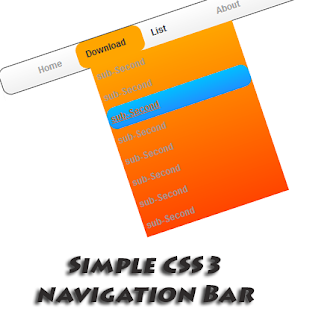

Attractive+Simple+CSS3+Navigation+for+Blogger
Demo


1. Log in to blogger account and Click drop down.

blog-post-option
2. Now select "Template" Like Below.

Select-template
  
4. Find this tag by using Ctrl+F    ]]></b:skin>

5. Paste below code Before ]]></b:skin> tag

/* The CSS3 Code for the menu starts here bloggertrix.com */
#btrixsimplemenu{
 clear:both;
 margin:5px auto;
 border:0px solid #000;
 font-size:12px;
 font-family: verdana;
 height: 236px;
}

ul#li{color:black;}
ul#level-one{
 width:700px;
 height: 36px;
 position: relative;
 list-style: none;
 line-height:36px;
 background:#f0f0f0 url("https://blogger.googleusercontent.com/img/b/R29vZ2xl/AVvXsEip6XCp65xUoEV2rcwYrhdUFECR5p4xeMqRJj34bNwMjAIBN3T-unP-FPwnYQMYUd9b-98VAxMUtgBLI2_FVFnDu5tb7w5Z0GA0399bR4j-dQ5adgCnpVL8qt-4JCQ_NBn44fdCyipDRn4/s1600/btrix_menu-back.png") repeat-x bottom left;/* for non-css3 browsers */
 background: -webkit-gradient(linear, left top, left bottom, from(#FFFFFF), to(#f0f0f0)); /* for webkit browsers */
 background: -moz-linear-gradient(top,  #FFFFFF,  #f0f0f0); /* for firefox 3.6+ */ 
 border:solid 1px #4d4d4d;
-moz-border-radius-topleft: 11px;-moz-border-radius-topright:11px;-moz-border-radius-bottomleft:11px;-moz-border-radius-bottomright:10px;-webkit-border-top-left-radius:11px;-webkit-border-top-right-radius:11px;-webkit-border-bottom-left-radius:11px;-webkit-border-bottom-right-radius:10px;border-top-left-radius:11px;
border-top-right-radius:11px;
border-bottom-left-radius:11px;
border-bottom-right-radius:10px;
}
ul#level-one li{
 width:80px;
 float: left;
 font-weight: bold;
 font-family: Arial;
 padding-left: 12px;
 border:solid 0px #000000;-moz-border-radius-topleft: 11px;-moz-border-radius-topright:11px;
-moz-border-radius-bottomleft:11px;-moz-border-radius-bottomright:10px;-webkit-border-top-left-radius:11px;-webkit-border-top-right-radius:11px;-webkit-border-bottom-left-radius:11px;-webkit-border-bottom-right-radius:10px;
border-top-left-radius:11px;
border-top-right-radius:11px;
border-bottom-left-radius:11px;
border-bottom-right-radius:10px;
}
ul#level-one li:hover{
 background:#FFA500;
 border:solid 0px #000000;
-moz-border-radius-topleft: 11px;-moz-border-radius-topright:11px;-moz-border-radius-bottomleft:11px;-moz-border-radius-bottomright:10px;-webkit-border-top-left-radius:11px;-webkit-border-top-right-radius:11px;-webkit-border-bottom-left-radius:11px;-webkit-border-bottom-right-radius:10px;
border-top-left-radius:11px;
border-top-right-radius:11px;
border-bottom-left-radius:11px;
border-bottom-right-radius:10px;
}
ul#level-two,ul#level-three,ul#level-four{
 list-style: none;
 background:#FFA500 url(https://blogger.googleusercontent.com/img/b/R29vZ2xl/AVvXsEjC72UPKAvVzCTUAi27bdgaso4akqVklgfmDnQsjhj0njXr3rHyVMDS4ppo7eipq3jdsYsMgWpX0L32TUVEjlm9LHt5jHxqaU9cRHGIhUiumq0LPntc0W9raMVAUjHy4eCf0O8_w1DwmbA/s1600/btrix_menu-grad.png) repeat-x bottom left; /* for non-css3 browsers */
 background: -webkit-gradient(linear, left top, left bottom, from(#FFA500), to(#FF4500)); /* for webkit browsers */
 background: -moz-linear-gradient(top, #FFA500, #FF4500); /* for firefox 3.6+ */ 
 display:none;
 position:absolute;
 top:36px;
 padding:0;
 width:200px;
 height:240px;
 border:0px solid red;
}
ul#level-two li,ul#level-three li,ul#level-four li{
 width:196px;
 padding-left:4px ;
 line-height: 30px;
}
ul#level-two li:hover{
 background:#f0f0f0 url(https://blogger.googleusercontent.com/img/b/R29vZ2xl/AVvXsEh5m3KI5x5kksmW6XykUcQO6aFM0lZLNLp3Wux4a2OMqC4MEFnKYoihewhBXu9wLUxjlaV2k-9IIx7ViPMnvB1Ro69Qt92A_APBnoxZzoNfGO3Ug-uNi2FOZUfyEZ7_FbeWQyCKkIsSRVE/s1600/btrix_menu-li.png) repeat-x bottom left;/* for non-css3 browsers */
 background: -webkit-gradient(linear, left top, left bottom, from(#fff), to(#c0c0c0)); /* for webkit browsers */
 background: -moz-linear-gradient(top,  #fff,  #c0c0c0); /* for firefox 3.6+ */ 
border:solid 0px #000000;
-moz-border-radius-topleft: 11px;-moz-border-radius-topright:11px;-moz-border-radius-bottomleft:11px;-moz-border-radius-bottomright:10px;-webkit-border-top-left-radius:11px;-webkit-border-top-right-radius:11px;-webkit-border-bottom-left-radius:11px;-webkit-border-bottom-right-radius:10px;
border-top-left-radius:11px;
border-top-right-radius:11px;
border-bottom-left-radius:11px;
border-bottom-right-radius:10px;
}
ul#level-one li:hover > ul#level-two,ul#level-one li:hover > ul#level-three,ul#level-one li:hover > ul#level-four {
 display: block;
}
a{
 width:200px;
 text-align: center;
 text-decoration: none;
 color:#000000;
}
ul#level-three li:hover{
 background: #00BFFF url(https://blogger.googleusercontent.com/img/b/R29vZ2xl/AVvXsEioYGNsln0qbqj0dOjaAQxHt1UB_2hgXn8S7y5meui6gTi2iAAnhO-T5H_onHn823ap2HJ9eOBWehlBnzTNHjPL8rez8PoZuB9aQ97aWY-EiecVFGHUmpP1DDKu7cGw724uprBAszCUy3M/s1600/btrix_menu-li-blue.png) repeat-x bottom left;
 background: -webkit-gradient(linear, left top, left bottom, from(#00BFFF), to(#1E90FF)); /* for webkit browsers */
 background: -moz-linear-gradient(top, #00BFFF, #1E90FF); /* for firefox 3.6+ */ 
 border:solid 0px #000000;
-moz-border-radius-topleft: 11px;-moz-border-radius-topright:11px;-moz-border-radius-bottomleft:11px;-moz-border-radius-bottomright:10px;-webkit-border-top-left-radius:11px;-webkit-border-top-right-radius:11px;-webkit-border-bottom-left-radius:11px;-webkit-border-bottom-right-radius:10px;
border-top-left-radius:11px;
border-top-right-radius:11px;
border-bottom-left-radius:11px;
border-bottom-right-radius:10px;
}

7. Go to blogger and click Layout

6. Click Add Gadget and select 'HTML/Javascript

7. Paste below code.

<div id="btrixsimplemenu">
<ul id="level-one">
<li><a href="#">Home</a></li>
<li>Campaign 
 <ul id="level-two">
<li><a href="#">sub-Second</a></li>
</ul>
</li>
<li>Download
 <ul id="level-three">
<li><a href="#">sub-Second</a></li>
</ul>
</li>
<li>List
 <ul id="level-four">
<li><a href="#">sub-Second</a></li>
</ul>
</li>
<li><a href="#">About</a></li>
<li><a href="#">Demo</a></li>
<li><a href="#">Contact</a></li>
</ul>
</div>

8. Now save your HTML/Javascript'.

    You are done...


If you have any question about any Post, Don't hesitate to ask question.You can simply drop a comment below post or contact via contact Us form by Clicking Here Your Feedback always appreciated.